
How to Monitor Remote Digital Screens Across Multiple Sites
Manage digital screens from a central cloud CMS—monitor health, set alerts, schedule content, troubleshoot remotely and track audience analytics securely.
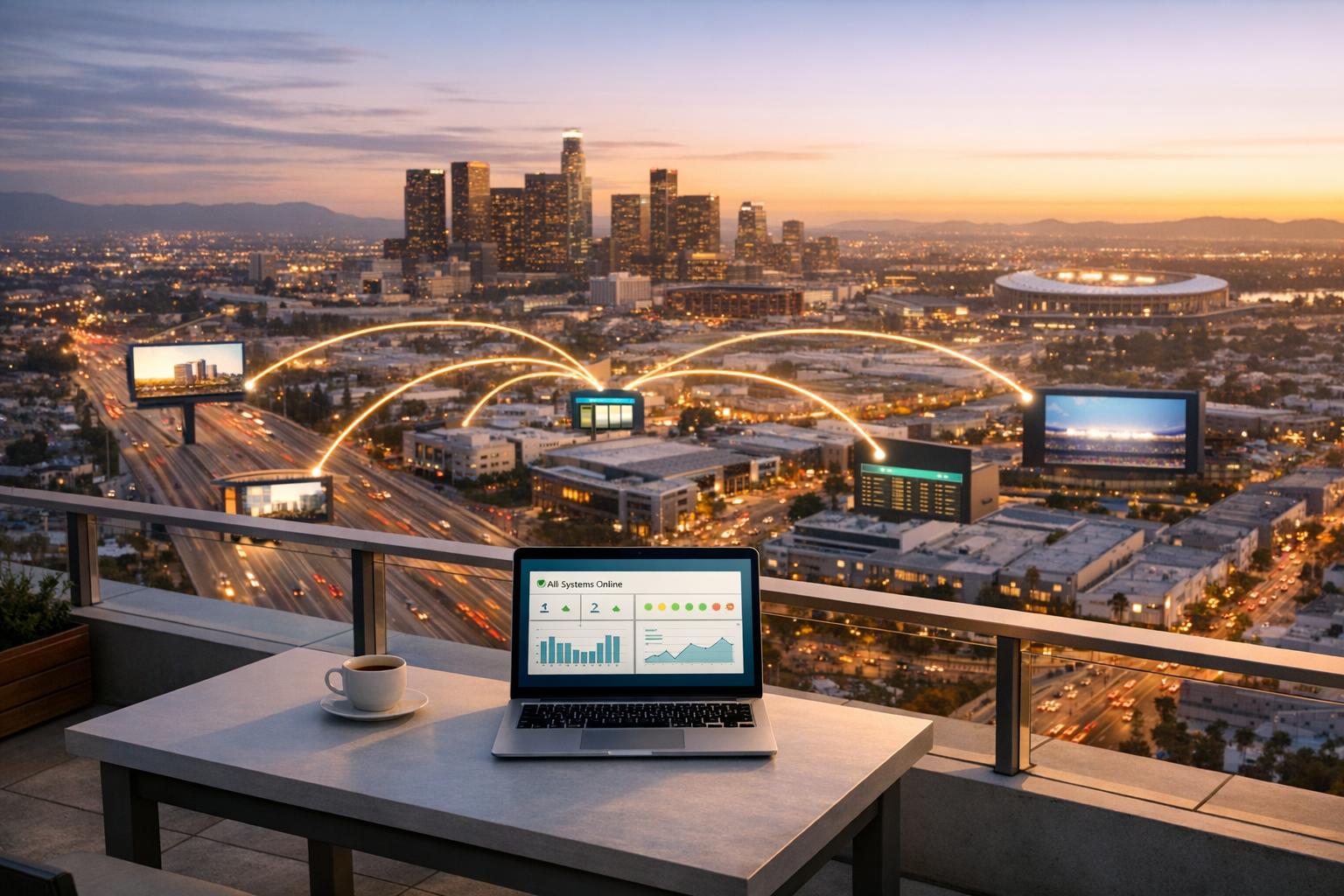
How to Monitor Remote Digital Screens Across Multiple Sites
Managing digital screens across multiple locations can feel overwhelming, especially when dealing with technical issues, content updates, and consistency across sites. A cloud-based Content Management System (CMS) simplifies this process by allowing you to control everything remotely, ensuring screens are functional and up-to-date without physical intervention. Here's a quick summary of how to streamline operations:
- Centralised CMS: Manage all screens from one platform, push updates instantly, and monitor screen health in real-time.
- Remote Monitoring: Use tools like heartbeat checks, snapshots, and IoT sensors to detect issues early.
- Automated Alerts: Get notified of problems like power loss or connectivity issues via email or SMS.
- Real-Time Analytics: Track screen performance and audience engagement to optimise content.
- Advanced Scheduling: Plan campaigns in advance, customise content by region or time, and ensure smooth transitions.
- Remote Troubleshooting: Diagnose and fix issues like software glitches or connectivity problems without site visits.
- Security and Permissions: Use role-based access and encryption to protect your network and maintain brand control.
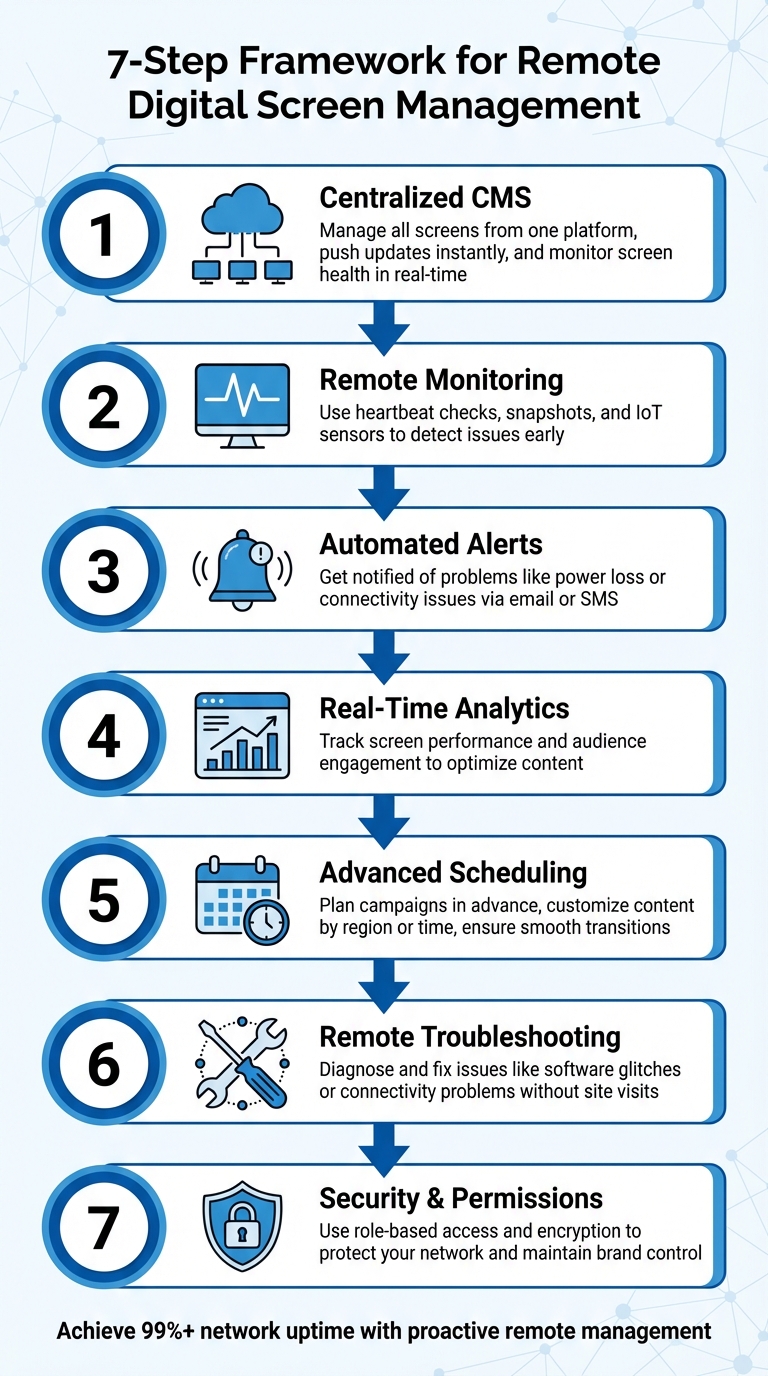
7-Step Framework for Remote Digital Screen Management Across Multiple Sites
Using a Centralised CMS to Manage Remote Screens
Managing screens across multiple locations - whether it's Brisbane, Perth, or smaller regional areas - can be a logistical nightmare if updates are done manually. Logging into each device individually isn't just time-consuming; it's practically impossible at scale. That's where a cloud-based content management system (CMS) comes in. By centralising control, you can manage every screen from a single platform, accessible through any web browser. Instead of juggling individual updates, you can push changes remotely and monitor screen health in real time.
A cloud-based CMS also simplifies deployment. Screens can be grouped by region, store type, or even marketing campaigns. For example, you can roll out a weekend promotion across all Queensland outlets with just a few clicks. What used to take hours - or even days - can now be done in minutes, while still allowing for tailored content at specific locations when needed.
How Adflux CMS Simplifies Screen Management
Adflux CMS is a cloud-based platform that eliminates the need for onsite software or servers. You can log in through any web browser and manage your entire network of screens - whether that's 10 or 1,000 spread across the country - all from one dashboard. The system shows the last image displayed on each screen and flags any devices that aren't currently reachable, giving you instant visibility into your network's status.
The platform supports a wide range of media formats, including photos, videos, and live web page URLs. Its hardware-agnostic design means you’re not tied to specific devices, so you can make the most of the screens you already have. For businesses running Retail Media Networks, this centralised approach ensures that paid advertising campaigns are displayed correctly and consistently across all locations. Advertisers also benefit from proof that their content ran as intended, enhancing accountability.
Tools for Managing Multi-Site Networks
Adflux CMS includes advanced scheduling tools that allow you to plan content weeks - or even months - in advance. With "set-and-forget" functionality, you can create playlists of themed content and assign them to specific screens or groups. For instance, a breakfast menu playlist can run from 6:00 AM to 11:00 AM, automatically switching to lunch content without requiring manual updates.
The platform also offers a multi-user permission system, which is essential for managing larger networks. You can assign different access levels - like viewer, editor, or manager - so local teams can make updates while head office retains control over branding and overall governance. Adjusting permissions is straightforward, ensuring smooth operations without disrupting the network.
For businesses that rely on real-time data, API integration is a game-changer. The CMS can connect directly to external systems, like inventory databases, to automatically update screen content. For example, if an item goes out of stock, the system can stop displaying its promotion, keeping your messaging timely and relevant.
Given Australia's vast geography and varying internet reliability, Adflux CMS incorporates asynchronous synchronisation. Content downloads in the background, switching only after verification to avoid blank screens during updates. Even if a location temporarily loses internet connectivity, screens will continue to play cached content until the connection is restored, ensuring uninterrupted campaigns - an essential feature for Retail Media Networks.
Next, learn how to implement remote monitoring and alerts for even more proactive screen management.
sbb-itb-c231c83
Setting Up Remote Monitoring and Alerts
Once you've centralised your screens using a CMS, the next step is ensuring they stay online and functional. Remote monitoring achieves this through heartbeat checks - regular pings to confirm connectivity - and a snapshot feature that shows the last displayed image, verifying the content is rendering correctly.
Adding IoT sensors can further strengthen monitoring. For example, temperature sensors are essential for outdoor displays or enclosed kiosks, where overheating could damage hardware. Power monitoring helps distinguish between network issues and power outages, while display quality sensors keep an eye on visual performance. For businesses managing screens in regional Queensland or remote areas of Western Australia, these tools can help avoid costly site visits by catching small issues early.
Configuring Device Sensors
Effective sensor setup is the backbone of proactive maintenance. Start by identifying critical metrics to monitor - like temperature and humidity in challenging environments. For instance, you can set temperature alerts to notify you if internal conditions exceed 35°C. Power sensors can detect outages or tampering, while connectivity sensors highlight network disruptions before they interfere with content delivery.
More advanced systems can even use external sensors to trigger specific content updates. Imagine a parking lot display that automatically switches to "full" when fewer than 10% of bays are available. This kind of automation reduces manual intervention and ensures messaging stays relevant in real time. Once you've determined sensor thresholds, automated alerts can ensure any issues are flagged immediately.
Creating Automated Alerts
After setting up sensors, automated alerts keep you informed of any anomalies. Through your CMS dashboard, you can configure alerts for specific events like "Screen Offline Status" or "Power Loss" and choose how notifications are delivered, whether via email or SMS. To minimise false alarms from brief network hiccups, set a disconnection delay - about five minutes is a good starting point.
Organising your screens into groups based on location or function - such as "Main Lobby Screens" or "Queensland Outlets" - can streamline notifications. Instead of being bombarded with individual alerts for every screen, you'll receive consolidated updates for the entire group. You can also adjust alert settings to align with your operational hours. If screens are intentionally powered down overnight, configure monitoring to exclude those periods, avoiding unnecessary alerts. For businesses operating Retail Media Networks, this ensures campaigns run as planned, with immediate visibility into any disruptions.
"Screen monitoring alerts provide timely notifications if a screen or group of screens disconnects. By customising alert settings such as notification timing and disconnection delay, you can maintain uninterrupted content delivery." - Comeen Help Centre
With sensors and alerts in place, you're ready to take oversight to the next level with real-time analytics, which we'll explore in the following section.
Tracking Performance with Real-Time Analytics and Reporting
Real-time analytics take content management to the next level, complementing remote monitoring by offering deeper insights into how your displays are performing. These analytics don't just track uptime; they reveal how well your screens are engaging audiences. Since digital signage generates far more views compared to other media, tracking performance becomes a critical part of any strategy.
Modern CMS platforms focus on two key areas: technical performance monitoring and audience engagement insights. Technical metrics help you stay ahead of potential issues, such as receiving an alert if a screen in Darwin starts overheating. On the other hand, engagement analytics track viewer numbers and interaction times, turning impressions into measurable data. This data can even unlock advanced tools like AI vision analytics, helping you refine your content strategies further.
AI-Powered Vision Analytics
AI-powered vision analytics use built-in cameras to anonymously collect data about viewers, such as the number of people, their dwell times, and demographics like age range and gender. Importantly, no personally identifiable information is stored. This technology does more than just count foot traffic - it measures actual engagement, providing a clearer picture of how your content is performing.
For example, Adflux CMS integrates third-party vision analytics to assess whether your products are reaching the right audience. A fashion retailer might discover that a campaign aimed at younger shoppers is unexpectedly resonating with a different demographic, prompting a quick adjustment to their creative approach. These tools can even update content automatically - displaying youth-oriented promotions when the audience skews younger, for instance. Additionally, vision analytics can track foot traffic patterns and identify high-interaction zones, helping you place screens in optimal locations like busy shopping centre entrances or transit hubs.
"onQ Measure revolutionises digital advertising by enabling the delivery of highly relevant and timely content tailored to your audience." - onQ Digital
Proof-of-Play Reporting
Proof-of-play (PoP) reporting offers a detailed record of when and where your content was displayed. These logs show how long an asset was displayed and how many times it appeared on specific screens. For businesses managing Retail Media Networks with third-party advertisers, PoP reports are essential. They justify campaign spending and ensure compliance with contractual agreements.
Even if internet connectivity is lost, devices can store up to 10,000 playback log entries locally. For instance, a device displaying an image every 10 seconds can retain about 27 hours of playback history before reaching its limit. Reports are usually stored for three to six months and can be exported as PDF or CSV files for easy stakeholder review. By integrating PoP data with Point of Sale information through APIs, retailers can directly link on-screen content to sales performance. This makes it possible to measure how specific campaigns drive revenue, providing a clear audit trail for campaign analysis.
Scheduling Content and Managing Playlists Remotely
Once you've set up monitoring and analytics, the next step is ensuring your content reaches the right screens at the right time. A cloud-based CMS simplifies this by allowing you to schedule campaigns far in advance - weeks or even months ahead. This eliminates the need for daily updates, freeing up time and letting you plan an entire quarter's promotions in one go. After that, the system takes care of the rest.
You can also group screens based on criteria like region, store type, or department, enabling updates across multiple displays all at once. For instance, with Adflux CMS, you can create themed playlists and assign them to specific screens or groups. Take a quick-service restaurant chain as an example: breakfast menus can run from 6:00 AM to 10:30 AM, then automatically switch to lunch menus without requiring manual changes.
Features like dayparting and weekparting let you customise content for different times of the day or days of the week. A shopping centre might show family-friendly content on weekends and shift to business-oriented messaging during weekdays. This kind of automation ensures your content stays relevant. In fact, 80% of companies report higher sales after adopting digital signage. These time-based strategies lay the groundwork for even more advanced scheduling options.
Advanced Scheduling Features
You can take automation further by integrating your CMS with external databases to adjust content based on real-time data, such as inventory levels. For example, a retail store could automatically hide promotions for items that are out of stock or update pricing displays based on current inventory. To avoid disruptions, you can also set up default playlists as a safety net. If a scheduled campaign ends or a network issue arises, your screens will display evergreen content instead of going blank.
Another powerful tool is screen tagging. By assigning tags like "Lobby", "Entry Gate", or "Staff Room" to specific screens, you can instantly push urgent messages - like weather-related closures - to the appropriate displays across multiple locations. To keep everything running smoothly, multi-site controls are key to securing your scheduled content.
Multi-Site Permissions and Control
Once your content scheduling is in place, managing access across different sites ensures consistent branding and smooth operations. A maker-checker system adds an extra layer of security by requiring managerial approval for any content changes made by local staff before they go live. Audit logs provide a detailed record of every action, complete with timestamps, making it easy to trace and resolve errors quickly.
This combination of advanced scheduling and controlled access gives you the tools to deliver targeted, timely, and reliable content across your network.
Troubleshooting and Maintaining Screens Remotely
Even with careful planning and constant monitoring, technical hiccups can still pop up. The real trick is sorting these out quickly, without needing to send someone on-site. A cloud-based CMS doesn’t just handle your content scheduling - it also enables remote diagnostics and fixes, so you can keep everything running smoothly right from your desk.
Remote Diagnostics and Repairs
If a screen stops working or struggles to update content, start by checking its last displayed image and connectivity status through the CMS dashboard. Use the "Sync Now" option to refresh content if necessary.
For more stubborn issues, a remote reboot can often clear up software glitches or memory problems. Your CMS might also let you access device logs, which can help identify error codes. From there, you can push firmware updates or tweak settings directly through the system.
Connectivity problems? Double-check that cables are secure, the input source is correctly selected, and that each device has at least 2 Mbps of stable bandwidth.
Another common culprit is incorrect time and date settings, which can mess with certificates and scheduling. Using NTP (Network Time Protocol) to automatically sync the time can help avoid these issues.
These remote troubleshooting steps ensure your screens stay functional and pave the way for proactive maintenance.
Preventative Maintenance Methods
Stopping problems before they start not only saves time but also helps your hardware last longer. Schedule automatic reboots during low-traffic times (e.g., 3:00–4:00 AM) to clear memory and apply updates.
Set up a routine maintenance schedule that includes:
- Weekly hardware checks to ensure cables and power connections are secure.
- Monthly clearing of cache and logs to prevent storage issues.
- Quarterly firmware updates for security patches and added features.
For physical setups, proper ventilation is key. Leave at least 5 cm of space behind and above screens, and keep room temperatures below 35°C to avoid overheating. Whenever possible, opt for wired Ethernet connections instead of WiFi to prevent signal dropouts and eliminate the hassle of updating passwords across multiple locations.
Managing Governance and Security for Remote Networks
When managing screens across various locations, securing your network is just as important as keeping your content updated. Without proper safeguards, you could face unauthorised changes, data breaches, or compliance issues - especially under Australia's strict privacy regulations. Security measures are as crucial to remote network management as real-time monitoring and content scheduling.
Multi-User Permissions and Brand Safety
Role-Based Access Control (RBAC) is a smart way to assign permissions tailored to specific roles. For example, you can create roles like Admin, Content Manager, Editor, or Viewer, each with their own access levels. This means a Melbourne store manager can update local promotions without accidentally altering content in Brisbane locations.
"With multi-user support, businesses can easily assign accounts with varying permission levels to relevant employees. Additionally, when an employee changes roles or leaves the company, management can easily remove that employee's account while keeping top-level administrative access." - AdFlux Australia
Take it a step further with granular controls - limit access to specific screens, content folders, or regions so users only see what's relevant to their responsibilities. Adding approval workflows ensures that content is reviewed by an editor or administrator before going live, reducing the risk of errors or brand inconsistencies.
To safeguard data, use 256-bit AES encryption and host data locally through Australian AWS regions to comply with privacy regulations. Strengthen your network with site-to-site VPNs and firewalls, creating a secure perimeter around your infrastructure. These measures create a solid foundation for integrating external systems securely.
API Integrations for Scalable Management
As your network grows, API integrations can streamline operations by automating workflows and connecting your screens to essential business tools. RESTful or GraphQL APIs enable your CMS to pull data from ERPs, CRMs, or inventory systems, displaying real-time stock levels or personalised offers without manual intervention.
For more complex setups, middleware or Integration Platforms as a Service (iPaaS) like Zapier or Workato can aggregate data from multiple sources and manage rate limiting. Webhooks can also send instant alerts to monitoring systems if something goes wrong - like a screen going offline or a campaign failing to launch.
Security remains a top priority here. Use OAuth 2.0 or JWT tokens to secure integrations, and apply strict input sanitisation to guard against injection attacks. Keep detailed audit logs of all API activities, and consider network segmentation to separate your digital signage systems from your main corporate network. These steps ensure your remote screens run smoothly, securely, and in compliance with regulations.
Conclusion
Managing digital screens across multiple sites doesn't have to mean endless physical visits or last-minute troubleshooting. By using strategies like centralised CMS control, automated alerts, real-time analytics, and secure API integrations, you can ensure your network runs smoothly across Australia.
As highlighted earlier, remote management is a critical component of operational success. Industry professionals echo this sentiment:
"In today's enterprise environments, digital signage remote management isn't optional - it's foundational. It protects uptime, streamlines maintenance, and ensures that your communication systems work flawlessly across every location."
– Mic Wilborn, Author, Poppulo
To make day-to-day operations more efficient, group your screens logically by region and implement a set-and-forget content schedule at least a month in advance. Pair this with remote health monitoring to detect and address issues before they impact your audience. Together, these steps create a system that operates with minimal intervention.
These strategies not only tackle common challenges but also position your network for long-term success. With the rise of retail media networks, screens have evolved from simple communication tools to revenue-generating assets. Efficient monitoring and streamlined content delivery help safeguard that revenue while cutting operational costs. By adopting proactive maintenance and automation, you can achieve over 99% network uptime without relying on costly on-site support.
Whether you're overseeing ten screens or a thousand, Adflux CMS offers the tools you need - centralised control, automation, and robust security - to scale effectively. By putting these strategies into action, you can build a digital signage network that consistently performs across all locations.
FAQs
What internet speed does each screen need?
To ensure smooth content delivery and effective remote management, each digital screen typically needs a minimum internet speed of 10 Mbps. That said, the actual speed requirements can differ depending on how complex the content is and the specifics of your network setup. A reliable connection is key to keeping your screens performing consistently.
How do screens keep playing if the internet drops out?
When the internet goes down, screens can still show content thanks to local caching. This means media files and playlists are stored directly on the device, allowing scheduled content to keep playing smoothly, even during extended outages. Once the connection is back, updates sync automatically, so everything stays up to date. Features like caching and automatic recovery make sure your screens stay active and never go blank, even when connectivity hiccups occur.
How can I stop staff changing the wrong screens?
To ensure staff don’t accidentally modify the wrong screens, implement role-based access controls in your digital signage management system. This approach limits editing permissions to designated screens or groups, reducing the chance of errors.
Take advantage of centralised control features, such as bulk operations and real-time monitoring, to keep a close eye on changes across your network. To further minimise mistakes, offer regular training sessions and set up clear, step-by-step protocols. These measures will help staff stay aligned with best practices for updating content and managing screens effectively.
Adflux Editorial
Retail media, programmatic DOOH, and digital signage insights for Australian retailers.
Ready to build your retail media network?
Talk to the Adflux team about how the platform can work for your screens.